Go to the Home Page - IECI Logo

Interworld Electronics

 
and Computer Industries Inc.         
Interworld Electronics Home Page
  Your ALT-Text here Home    Your ALT-Text here Data Acquisition    Your ALT-Text here Pico    Your ALT-Text here Software
PicoScope 9000
PicoScope 5000
PicoScope 3000
PicoScope 2000
ADC-200-100 
ADC-40/42/and ADC-100 
ADC-20 and ADC-24
ADC-212 and ADC-216  Precision PC Based Oscilloscope
USB Pen Scope
Software Options for the ADC-200
Palm to ADC-16 (Application Note)
Temperature & Humidity 
High Speed High Resolution ADC-212
DrDaq Low Cost Data Acquisition 
Automotive Products
Demo Software and Upgrades
Enviro Mon Data Logger for  temperature etc.
DrDaq Low Cost Data Acquisition 
PicoLog  Logging Software
Press Releases 
Technical tips

Pico Software

Converts PC to Oscilloscope (1435 bytes)
Digital Storage Oscilloscope Software   

Spectrum Analyser Software 

Digital Multimeter Software

Picolog Software 

Display Modes

Latest software releases

As soon as we release new software, it is made available for FREE download from our web site. To check which version you are using, start the software (PicoScope, PicoLog or EnviroMon) and select HELP | ABOUT.

The current releases are
PicoScope R5.16.2
PicoLog R5.16.2
Pico Automotive R5.16.2
EnviroMon R5.13.7
Drivers R5.08.7

Software can be downloaded from:
http://www.picotech.com/download.html

Now Vista Compliant

Technical tip
PicoScope measurements and alarms

PicoScope software has over thirty automated measurements
available such as frequency, rise time, duty cycle, THD, SINAD etc. These measurements are selected from the Settings menu and appear at the bottom of the oscilloscope or spectrum window. As well as current values, minimum, maximum and average values can also be displayed.

It is also possible to set test limits and alarms, for example an audible alarm could be set to occur every time the rise time of a signal fails to meet a certain threshold.

More information on measurements can be found in the PicoScope help file.


Digital Storage Oscilloscope Software Return to top of page

bt-square-blue.gif (2436 bytes) Real time digital storage oscilloscope .
bt-green-square.gif (2436 bytes) Grid gives actual voltages and times - no more counting divisions.
bt-green-square.gif (2436 bytes) Rulers for accurate measurements of time and amplitude.
bt-green-square.gif (2436 bytes) Chart recorder mode al low speeds.
bt-green-square.gif (2436 bytes) Both axes have multiplier zoom in on a particular event.
bt-green-square.gif (2436 bytes) Pre and post trigger delays selectable in 1% steps.

PicoScope provides all the functionality of a ‘conventional’ benchtop scope, together with additional functions made possible by the PC connection. Regular scope users will feel immediately at home, all the basic functions such as timebases, voltages ranges and trigger options are easy to access using the button bars. Less frequently used options are accessible through drop down menus. This balance allows maximum use of the screen area for the display of the traces.

A common use for digital storage scopes is in finding intermittent faults in both analog and digital systems. The ability to capture ‘one off’ events depends on the power and versatility of the scope trigger. For example, PicoScope has two special trigger modes to help capture these signals. The first is a display overwrite mode: any differences from the normal waveform will be clearly highlighted even if they only occur once. The second is ‘write to disk’ on trigger: in this mode the scope can be left running for long periods of time (for example to find a fault in an alarm system). Each time the trigger event occurs, the waveform will be saved to disk complete with a time/date stamp.

Download Demo

 
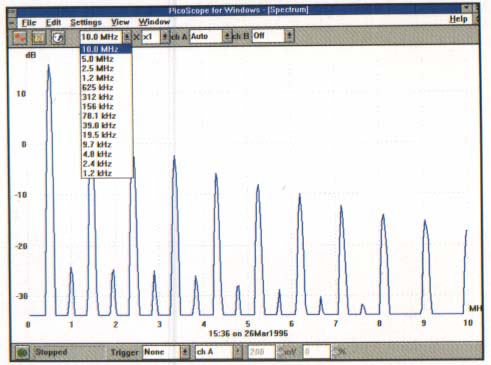
Spectrum Analyser Software Return to top of page

bt-green-square.gif (2436 bytes) FFT spectrum analyser allows one off events to be captured.
bt-green-square.gif (2436 bytes) 7 Window types.
bt-green-square.gif (2436 bytes) Signal Averaging.
bt-green-square.gif (2436 bytes) Same trigger options as oscilloscope.
bt-green-square.gif (2436 bytes) Rulers for amplitude and frequency measurement.
bt-green-square.gif (2436 bytes) Lin/log scaling for both axes.

A spectrum anaylser is one of those tools that once you start using it you don’t know how you coped before. For example, if the scope shows noise on a power line, but you do not know what is causing it, just open up a spectrum. This will show all the frequency components of the noise, showing whether the noise is coming from mains interference, switching power supply or maybe the clock of a microprocessor. Audio engineers will especially welcome the ADC 100’s spectrum analyser which covers the entire audio spectrum at 12 bit precision - ideal for testing cross talk and frequency response in amplifiers.

pico_adc200-3a.jpg (29628 bytes)

Download Demo

 
Digital Multimeter Software Return to top of page

bt-green-square.gif (2436 bytes) Autoranging.
bt-green-square.gif (2436 bytes) True RMS voltmeter.
bt-green-square.gif (2436 bytes) dB measurement capability.
bt-green-square.gif (2436 bytes) Frequency Meter.
bt-green-square.gif (2436 bytes) Simultaneous display of multiple parameters.

As with the scope and spectrum, it is possible to have several multimeters on screen: this allows, for example, the frequency, AC voltage and DC offset of a signal all to be measured at the same time. Using the ‘composite view’ option this data can be combined in a single window together with the signal’s scope and spectrum traces.

Download Demo

pico_adc200-3b.jpg (39440 bytes)


Return to top of page


 USA Office: Tel: 1-877-902-2979    Fax: 1-877-FAX-IECI     Pacific  Time Zone    
                   Tel:1-425-223-4311    Fax: 1-425-223-4303     Pacific Time Zone
P.O. Box 1280. Street Address: 145 Tyee Drive, Point Roberts, WA 98281

Sales inquiries to:  sales at interworldusa.com  Support & Service: support at interworldusa.com

Western Canada: - Vancouver, B.C. Tel: 1-(604) 925-6150    Fax: 1-(604) 925-6170 Toll Free:1-(800) 663-6001

    2454 Haywood Ave, West Vancouver, B.C. V7V 1Y1
  Eastern Canada: - Markham, Ontario Tel: 1-(905) 513-7027    Fax: 1-(905) 513-7029 Toll Free:1-(800) 465-0164
3555 14th Ave, Unit 12, Markham, Ontario L3R 0H5

Sales inquiries to:  sales at interworld.ca    Support & Service: support at interworld.ca

To visit our Australian web site, please click here.