Go to the Home Page - IECI Logo

Interworld Electronics

 
and Computer Industries Inc.         
Interworld Electronics Home Page
  Your ALT-Text here Home    Your ALT-Text here Data Acquisition    Your ALT-Text here Pico    Your ALT-Text here Product
PicoScope 9000
PicoScope 5000
PicoScope 3000
PicoScope 2000
ADC-200-100 
ADC-40/42/and ADC-100 
ADC-20 and ADC-24
ADC-212 and ADC-216  Precision PC Based Oscilloscope
USB Pen Scope
Software Options for the ADC-200
Palm to ADC-16 (Application Note)
Temperature & Humidity 
High Speed High Resolution ADC-212
DrDaq Low Cost Data Acquisition 
Automotive Products
Demo Software and Upgrades
Enviro Mon Data Logger for  temperature etc.
DrDaq Low Cost Data Acquisition 
PicoLog  Logging Software
Press Releases 
Technical tips
PicoScope 6 Video Demo

USB Parallel Port (PP196)

Converts PC to Oscilloscope (1435 bytes)
    USB oscilloscope and data loggers


US Prices
CDN Prices

Privacy and Security


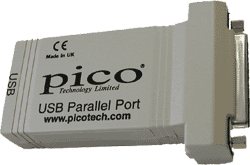
The USB to Parallel Converter allows you to connect Pico parallel port oscilloscope and data acquisition products to the USB port of a PC ( for  USB to Serial port adaptor see this page).

Please note that this converter is only suitable for use with Pico parallel port products — it can not be used with printers or other non Pico products.

Features and Benefits

  • With this adaptor all Pico parallel products are USB compatible
  • Free up your existing parallel port for printing
  • Use multiple devices on the same PC
  • Avoid IRQ conflicts
  • No need to install an add-in card or open the computer
  • LED light indicates power (when PicoScope or PicoLog software is running)
  • USB compliant

Package Contents

  • USB to Parallel converter
  • USB cable
  • Standard Pico CDRom
  • Easy installation guide

Installation

Installation is simple:

  1. Install the supplied software on to the PC
  2. Plug the parallel device into the USB adaptor
  3. Plug the USB adaptor into the computer's USB port

Most computers currently have serial, parallel and USB ports. The USB to parallel converter allows multiple products to be used on the same PC without adding extra cards, it also solves the problem of adding more parallel ports to laptops.

System Requirements

  • Windows 98, 2000, ME and XP
  • Available USB 1.1 (or higher) port
Put Links and images as needed here

Return to top of page


 USA Office: Tel: 1-877-902-2979    Fax: 1-877-FAX-IECI     Pacific  Time Zone    
                   Tel:1-425-223-4311    Fax: 1-425-223-4303     Pacific Time Zone
P.O. Box 1280. Street Address: 145 Tyee Drive, Point Roberts, WA 98281

Sales inquiries to:  sales at interworldusa.com  Support & Service: support at interworldusa.com

Western Canada: - Vancouver, B.C. Tel: 1-(604) 925-6150    Fax: 1-(604) 925-6170 Toll Free:1-(800) 663-6001

    2454 Haywood Ave, West Vancouver, B.C. V7V 1Y1
  Eastern Canada: - Markham, Ontario Tel: 1-(905) 513-7027    Fax: 1-(905) 513-7029 Toll Free:1-(800) 465-0164
3555 14th Ave, Unit 12, Markham, Ontario L3R 0H5

Sales inquiries to:  sales at interworld.ca    Support & Service: support at interworld.ca

To visit our Australian web site, please click here.