


|
|
|||
 |
|||
| Log In | |||
|
|||
|
|||
|
| |||
|
|||
| |||
|
|||
|
| |||
|
|||
| |||
|
|||
| |||
|
|||
| |||


The Palm Pilot has a 10-pin RS-232 serial connector, which can be used to communicate with a wide range of external devices.
Below is the pin-out description for the 10-pin serial edge connector:
From this it can be clearly seen that the ADC-16 can not be powered by a Palm Pilot alone.
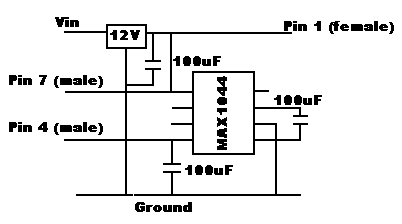
To get round the power problems an adapter had to be built. This is quite small and can run of a 9 volt PP3 battery. The device fits in series with the serial cable.
SoftwareThe ADC-16 has the following serial protocol:
The Palm Pilot operating system is unique and differs from Windows programming in many aspects. There are a number of development tools available for writing Palm Pilot applications, for this particular example VFDIDE was used. It is a C compiler with a Visual form designer built in and can be downloaded free of charge from: www.vfdide.com
The structure of the program is as follows:
Once the program is broken down into blocks it is easier to code the individual parts Start Application
|
|||||||||||||||||||||||||||||||||||||||||||||||||||||||||||||||||||||||||||||||



| Resolution (bits) | Conversion Time (ms) |
| 8 | 6.6 |
| 9 | 8.9 |
| 10 | 14 |
| 11 | 23 |
| 12 | 41 |
| 13 | 78 |
| 14 | 151 |
| 15 | 298 |
| 16 | 657 |
Once a request for data has been send it is neccessary to wait for a response. The duration of the delay between request and reply will depend on the resolution of the result:
SerReceiveWait(SerIORef, 3, 1000);
SerReceiveCheck(SerIORef, &nbytes);
anbytes = SerReceive(SerIORef, data, nbytes, 100, &err);
if (err != 0)
ret = false; else
ret = true;
SerReceiveFlush(SerIORef, 1);
return(ret);}
Display the result 
The data is returned in three bytes, the first byte is the sign, the second is the most significant byte (MSB) and the third is the least significant bit (LSB). In this example the sign is ignored.
value = (data[1]<<8) data[2];
volts = (2.5/65535)*value;
The problem now is that idealy the volts is floating point, however the Palm operating system does not have conventional ways of converting floating point values into strings.
FloatToString(volts, szvolts, 3);
StrCopy(szResult, "Voltage = ");
StrCat(szResult, szvolts);
WinDrawChars(szResult, StrLen(szResult),20,60);
The FloattoString function was taken from one of the many usergroups that offers assistance to palm programmers, it makes a rather neat solution to an otherwise tricky display problem.
Close serial port
It is essential that the port is closed after being used for a couple of important reasons:
- The serial port uses alot of power, keeping the time that it is open to minimum will keep battery usage down to a minimum
- Other applications that require the serial port will not function as access to the serial port will be denied
Results
Once the code has been compiled and downloaded to the Palm Pilot it is now possible to connect the ADC16 with aid from the power adapter.
Full code can be downloaded here: adc16.zip
References
ADC16 online help file, by Pico Technology Ltd
Palm Programming by Glen Bachmann, published by SAMS
www.palm.com
NewsGroups
pilot.programmer
pilot.programmer.gcc
Written by Matthew Laver
 |
 |
|||
|
|
|
 |